


How do I fix a disk write error when installing PokerStars?
Why does a disk write error occur?
A disk write error occurs when your browser, user permissions, or security software prevent the installer from running.
How do I fix a disk write error?
You can resolve a disk write error by following these steps:
Download the installer again
- Open your web browser
- Download the PokerStars installer file again.
- Run the installer
If the installer fails to launch, try using a different browser
Recommended browsers:
- Chrome
- Safari
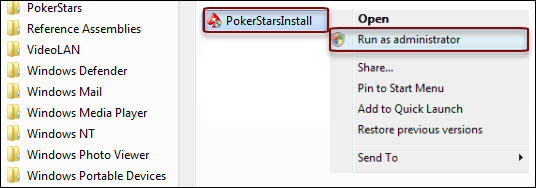
Run the installer as an administrator
If the error persists:
- Right-click the PokerStars installer file.
- Select 'Run as administrator'.
Screenshot showing
Temporarily disable security software
If the error persists:
- Temporarily uninstall your antivirus or firewall software.
- Rerun the PokerStars installer.
- Reinstall your security software after the PokerStars installation is complete.
What information should I provide if the error persists?
If the error persists, contact Support with these details:
- Operating system version (e.g., Windows 10, Windows 11)
- Download manager (if you used one)
- Security software name (e.g., McAfee, Webroot, Avast)
How do I contact Support?
You can contact Support through:
- Live Chat in the PokerStars software
- Live Chat in the mobile app
- Live Chat on the website
Include your PokerStars username when contacting Support.
Did you find this article useful?
Related Articles
- How do I get free Play Money chips?
- Cannot open a Chest
- Deposit with a card
- Connection issues: What can I do if the PokerStars software or app is not connecting to the server?
- Fix lobby issues in the desktop software
- Self-imposed deposit limits
- Using your account after GDPR data deletion
- General Terms
- Fix browser issues
- Fix connection issues using DNS